
A PSIM platform can look very different depending on who is looking at it. For a facility manager, it is a tool for centralising security management. For an operator, it is the working environment where every shift is spent. For an implementation engineer, it is a complex integration project that brings together systems from different manufacturers into a single, coherent whole.
Mateusz Stanisławski, project manager at ela-compil, has been working with GEMOS for years. In this article, he shares five aspects that, in his view, best describe the everyday reality of working with the platform.
1. User comfort
One of the first things new GEMOS operators notice is how flexible the working environment is. The platform does not impose a single, rigid way of presenting events — instead, it allows the interface to be adapted to the needs of a specific workstation and a specific facility.
Operators can decide for themselves how alarms are displayed, how the system visually responds to events from individual subsystems, and how the relationships between them are shown. Technicians, in turn, can perform group operations on multiple points simultaneously — this is particularly important in large facilities where the number of elements runs into the thousands.
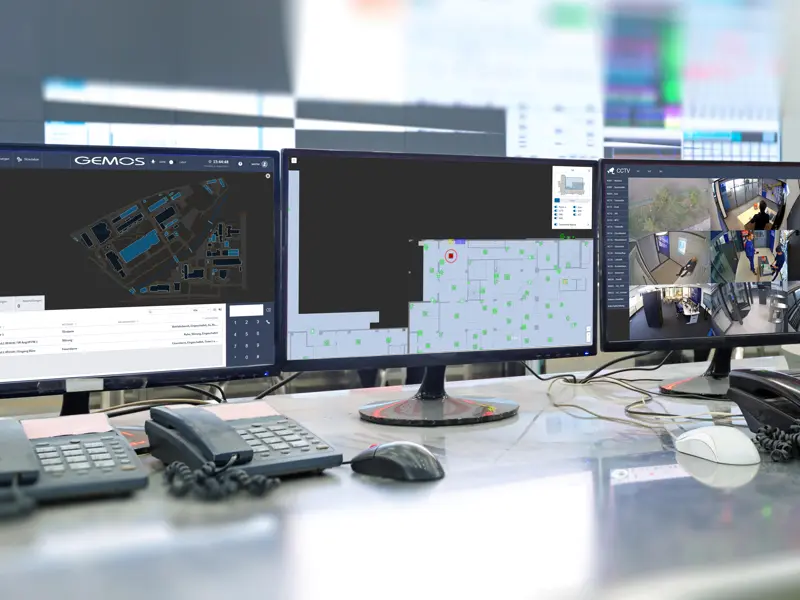
GEMOS also offers a wide range of visualisation methods: from classic technical panels to branched logical schematics that reflect the real relationships between devices. This level of configurability directly affects the speed of an operator’s response and the quality of their work under time pressure — as described in detail in the article Event Stack in a PSIM System — How Organised Information Improves Security.
2. Signal visualisation — the biggest challenge in the field
GEMOS deployments in large facilities regularly surface the same problem: signal visualisation. When a facility has thousands of data points — sensors, cameras, access controllers, building automation devices — manually placing each of them on situational plans becomes a substantial challenge.
It is not just a matter of time. Manual point positioning is also a source of errors: assigning a point to the wrong zone or placing an icon incorrectly on a plan can disorient an operator at exactly the moment when precision is critical.
GEMOS addresses this with a CAD plan import module with attribute mapping. Instead of manually transferring each point, the engineer imports data from a project file and the system automatically maps element positions onto the plans. This eliminates not only the tedious manual work, but primarily an entire class of errors associated with manual data entry.
It is precisely when integrating systems that have been running in a facility for years that this kind of automation delivers the most value — it allows existing project documentation to be brought into the PSIM environment efficiently, without having to re-enter everything from scratch.
3. What genuinely shortens deployment time
Three properties of GEMOS that matter most in practice during deployment are browser-based access, support for universal protocols, and tools for rapid signal visualisation.
Browser-based access means that the engineer — and after deployment, also the operator and administrator — can manage the full functionality of the system from anywhere on the network. There is no need to be physically present at a specific workstation. In practice, this shortens response times to issues and simplifies remote diagnostics. The broader implications of this choice for an organisation are covered in the article PSIM via Browser or Client Application?.
Universal protocols — BACnet, Modbus, SNMP — allow devices without a dedicated interface to be connected to GEMOS. Every larger deployment includes at least a few non-standard systems: an older controller, a device from a local manufacturer, an unusual industry-specific solution. With support for standard protocols, GEMOS handles these without requiring custom integration code to be written — which directly affects the project schedule. A full list of supported interfaces is available on the integrations page.
Rapid visualisation tools are particularly important where deadlines are tight. The ability to quickly add a signal to a view and immediately check its behaviour shortens the commissioning time for individual elements and simplifies ongoing testing.
4. Client-side challenges
One of the most common tensions that arises during deployments concerns the relationship between aesthetics and interface functionality.
Clients often expect a visually impressive environment — modern graphics, smooth animations, and an attractive screen layout. This is understandable: investment in a PSIM system is significant, and prestige plays a role in many organisations.
The problem is that what looks impressive in a demonstration does not always hold up in an operator’s daily work. An operator who needs to assess the status of dozens of zones within a few seconds needs an interface that is clear, not spectacular. Overly rich graphics, complex animations, or an unintuitive layout can genuinely slow down response times — especially in stressful situations.
Balancing these two poles — visual appeal and operational efficiency — is one of the most important tasks when designing the working environment in GEMOS. Experience shows that in facilities where human safety is at stake, functionality must always win over aesthetics.
Similar observations apply to the balance between detailed visualisation and clarity: the article SSWiN Visualisation in PSIM shows how good spatial presentation of an alarm affects the speed and quality of an operator’s response.
5. What takes up the most time
When it comes to the implementation engineer’s time, two stages stand out clearly from the rest.
The first is graphics processing for large facilities. Preparing situational plans — their scale, level of detail, information layer — requires careful attention. The larger the facility and the more floors it has, the more time and effort goes into preparing the visual layer of the environment.
The second, and by far the most labour-intensive, is placing data points on plans — that is, assigning each of the thousands of elements from integrated systems to the correct location on the situational plan. In large deployments, we are talking about tens of thousands of points: sensors, cameras, controllers, BMS devices, fire detection elements.
This is precisely why the CAD import module described in section 2 has such practical significance. Automating this stage is not merely a convenience — at the scale of a large facility, it is a prerequisite for maintaining a reasonable schedule and delivering a quality deployment.
Summary
Working with GEMOS PSIM means navigating a wide range of challenges every day: technical, project-related, and communicative. The flexibility of the platform translates into real operator comfort, but it requires the working environment to be carefully designed. Automating the most demanding deployment stages — above all, plan import and point mapping — determines the quality and pace of the project. And negotiating the balance between aesthetics and functionality is an inseparable part of every client conversation.
The common thread running through all five aspects is this: GEMOS is a platform that can be adapted to the needs of a facility and an organisation to a significant degree — but for that adaptation to deliver real value, it must be grounded in experience and a considered approach to implementation.
FAQ
- What makes working with GEMOS comfortable for operators?GEMOS lets operators customize how alarms are displayed and how the system interacts with other subsystems. Technicians benefit from the ability to perform group operations on multiple points simultaneously, while a rich set of visualization methods — from technical panels to branched schematics — allows the interface to be tailored to the specific facility.
- What protocols does GEMOS support for integrating non-standard devices?GEMOS supports universal communication protocols including BACnet, Modbus, and SNMP. This makes it possible to connect devices that have no dedicated interface, shortening deployment time and reducing dependency on specific manufacturers.
- How does GEMOS handle placing thousands of data points on situational plans?The most labour-intensive stage — manual point placement — is automated in GEMOS through a CAD plan import module with attribute mapping. Importing data from a CAD file eliminates the tedious manual positioning of each element and significantly reduces the risk of human error.