
Camera and security device datasheets often state that a product “supports ONVIF”. It is easy to read this as a guarantee of full compatibility with other systems. In reality, the scope of integration depends on the ONVIF profile, the firmware version and how the standard has been implemented on both sides of the connection. Below I explain the role ONVIF plays in acquiring video, what the individual profiles mean and when integration has to be supplemented with the manufacturer’s API. I also show the problems that most often surface during testing, along with the consequences of ONVIF ending support for Profile S in 2027.
How the world looked before ONVIF
Before ONVIF became widespread, an integrator had to know the correct URL for a specific manufacturer, model, channel and stream type. The path changed, as did the parameter names and sometimes even the way authentication credentials were passed.
A legacy of this way of working are public directories such as the iSpy Camera Connection Database. They contain dozens of RTSP and HTTP paths for various devices. The integrator picked a likely variant from the list and tested it on the physical camera.
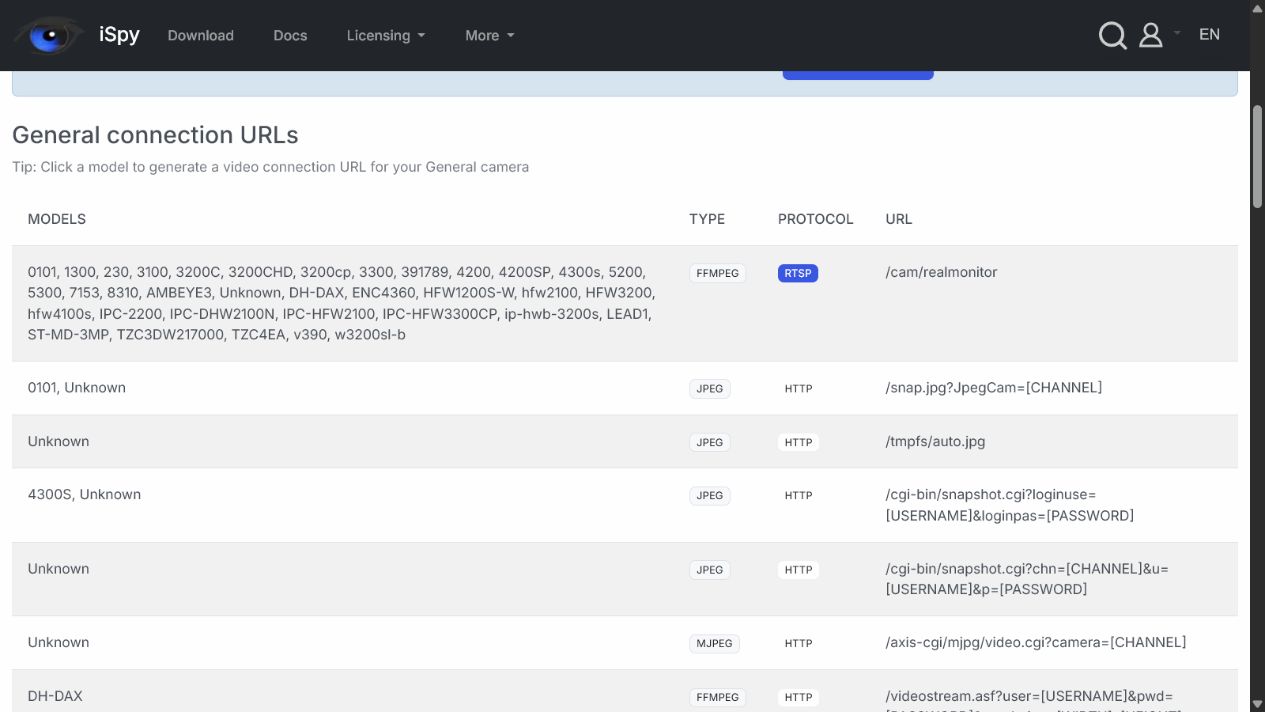
An excerpt from a community-maintained database of connection URLs. Source: iSpyConnect.
Where the ONVIF name comes from
The name ONVIF stands for Open Network Video Interface Forum — an open forum for standardising the interface of networked video products. The organisation was founded in 2008 by Axis Communications, Bosch and Sony, three manufacturers that set out to unify how IP devices communicate and to free integrators from single-vendor solutions. Over time the forum’s scope grew beyond video alone to include access control as well.
ONVIF does not transmit video
ONVIF is sometimes called a video transmission protocol, but that is a mental shortcut. The standard describes device discovery, reading a device’s capabilities, media configuration and how to obtain the information needed to start streaming.
The GetStreamUri operation returns the URI later used to start an RTSP session. Video flows over RTP, while RTCP carries control information about the transmission. The details are described in the ONVIF Media Service Specification and the ONVIF Streaming Specification.
The individual elements each play a different role in this process:
- ONVIF lets you obtain information and control the device’s standardised functions;
- RTSP is used to set up and control the session;
- RTP/RTCP handles media transport and control information;
- The codec determines how the video is compressed (e.g. H.264, H.265).
How device integration via ONVIF works
The client first discovers the device and checks the services it exposes. After authentication it reads the media profiles, retrieves the stream URI and starts receiving video. If both sides support the relevant functions, the same route can be used to integrate events, inputs and outputs, audio and PTZ control.

Device integration flow via ONVIF — from discovery, through service identification and authentication, to retrieving the URI, starting the RTSP/RTP stream and handling events and PTZ.
Automatic discovery often stops at the boundary of a network segment, because WS-Discovery uses multicast. In that case, entering the device’s service address manually can be enough to establish the connection.
ONVIF is not just about cameras
An ONVIF profile defines a set of functions common to a device and a client. Profiles cover video streaming and recording, analytics and access control.
| Profile | Use | Example devices |
|---|---|---|
| T | Advanced video, H.264/H.265, events, metadata, audio and PTZ | Cameras, encoders, client software |
| S | Basic video; profile being retired | Older-generation cameras, encoders and clients |
| G | Edge recording, search and playback | Cameras with a memory card, recorders |
| M | Metadata and analytics events | Analytics cameras, metadata-processing applications |
| C | Basic door control and event handling | Access controllers and clients |
| A | Access control system configuration | Controllers and management software |
| D | Access control peripheral support | Readers, locks and sensors |
ONVIF publishes the current scope on its Profiles page. A device conformant with one profile does not have to support the others or all optional functions.
“Supports ONVIF” does not always mean official conformance
The word “conformance” causes the most confusion. In marketing materials the terms “ONVIF”, “ONVIF compatible” and “ONVIF conformant” are used interchangeably. Yet they describe different situations:
- a technical implementation of the public specification;
- officially declared conformance of a specific product and firmware version;
- actual interoperability of the functions required in a given project.
A manufacturer’s membership in the organisation does not automatically cover its entire portfolio. In the ONVIF Conformant Products database you have to check the exact model, profile and firmware version. Testing is performed by the manufacturer, and some profile functions are optional. The rules of the process are described in the Conformance FAQ.
As a result, the video preview may work correctly while events, two-way audio, PTZ or analytics metadata remain unavailable.
ONVIF or the manufacturer’s API?
ONVIF provides a common set of functions across many brands, so there is no need to maintain a separate integration of basic operations for every manufacturer. The standard usually does not cover all of a device’s capabilities, however. Advanced analytics, diagnostics and the latest features are often available only through the manufacturer’s API or SDK.
In GEMOS integrations we first use the functions available through ONVIF and fill the gaps with the manufacturer’s interface. After a firmware update we retest the API-dependent part, because it is the most susceptible to change.
The most common problems in practice
In our testing, most time is taken up by differences between devices and by the network configuration. The following recur in particular:
- discovery blocked by network segmentation;
- an incorrect device clock causing authentication problems;
- the need to separately enable ONVIF or create a dedicated user;
- an incompatible codec, media profile, resolution or UDP/TCP transport;
- incomplete support for events, PTZ, audio or metadata;
- regressions after a firmware update.
A declaration of conformance does not replace testing a specific model on the target network. A video preview alone is not enough if the project also requires events, PTZ, audio or metadata.
Important for new projects
ONVIF will end support for Profile S on 31 March 2027. Existing devices will not stop working then. After that date, however, manufacturers will no longer be able to submit new products or new firmware versions for conformance with Profile S.
Profile S requires UsernameToken authentication, which ONVIF no longer considers consistent with current security recommendations. For new deployments the organisation recommends Profile T together with digest authentication or communication over TLS. Details can be found in the Profile S Deprecation Q&A and the official ONVIF announcement.
What to check before deployment
Before choosing a device you should:
- identify the required profile and the specific functions;
- check the model and firmware in the official ONVIF database;
- test events, PTZ, audio and metadata if they are required;
- repeat the test after a restart and after a planned firmware update;
- record the verified software versions in the project documentation.
This is how we work on GEMOS integrations: we start with the functions available in the standard and then identify those that require the manufacturer’s API. We also record the firmware versions and the scope of tests to repeat after an update.
What does this mean?
ONVIF solves a specific problem: it lets devices from different manufacturers expose basic functions in an agreed way. You still have to check the specific model and firmware. When a required function goes beyond the ONVIF profile, the integration is supplemented with the manufacturer’s API.
If you are planning to connect cameras, access control or analytics to GEMOS, get in touch with the ela-compil team. We will check the devices, the required functions and the scope of testing before deployment.
FAQ
- Does ONVIF transmit video from the camera?Not directly. ONVIF helps you obtain the parameters and the stream address, which is then handled by RTSP/RTP.
- Will Profile S stop working on 31 March 2027?No. What ends is the ability to declare new products and new firmware versions as conformant with Profile S, not the operation of existing devices.
- Will every camera labelled 'ONVIF' work with GEMOS?This cannot be guaranteed from the label alone. Before deployment we check the model and firmware in the ONVIF Conformant Products database and then test the functions required by the project.
- When is it worth using the manufacturer's API?When the project requires functions unavailable in the standard, such as specialised analytics, configuration or advanced diagnostics.
ONVIF® is a registered trademark owned by ONVIF, Inc. Any use of the ONVIF logo requires compliance with the ONVIF Brand Standards and the appropriate authorisation or consent of the trademark owner.